 Control Tower
 Single sign-on
Enterprise: single sign-on needs a Control Tower Enterprise license.
People can sign in to the console through your identity provider, over OpenID Connect or SAML 2.0: Okta, Microsoft Entra ID, Google Workspace, OneLogin, Auth0, Keycloak, Ping, JumpCloud, ADFS. With SCIM, the provider can also add, deactivate and remove people. Their groups at the provider decide their role here: admin, approver or viewer. Every sign-in, and every refused one, goes into the audit log.
Set it up
Set
CT_PUBLIC_URLto the address people use for the console, such ashttps://controltower.example.com. The identity provider sends people back there, so it must be the public address, not an internal one.People → Single sign-on → + Identity provider. The form shows the sign-in redirect URL to register at your provider,
https://controltower.example.com/admin/sso/<id>/callback. After you save, each provider's own URL is shown when you edit it.At your identity provider, create an OpenID Connect web application:
- sign-in redirect URL: the one above;
- grant type: authorization code;
- scopes:
openid email profile, plus whatever puts groups in the ID token (see Groups).
Copy its issuer URL, client ID and client secret back into Control Tower.
Test checks that Control Tower can reach the provider and read its settings (
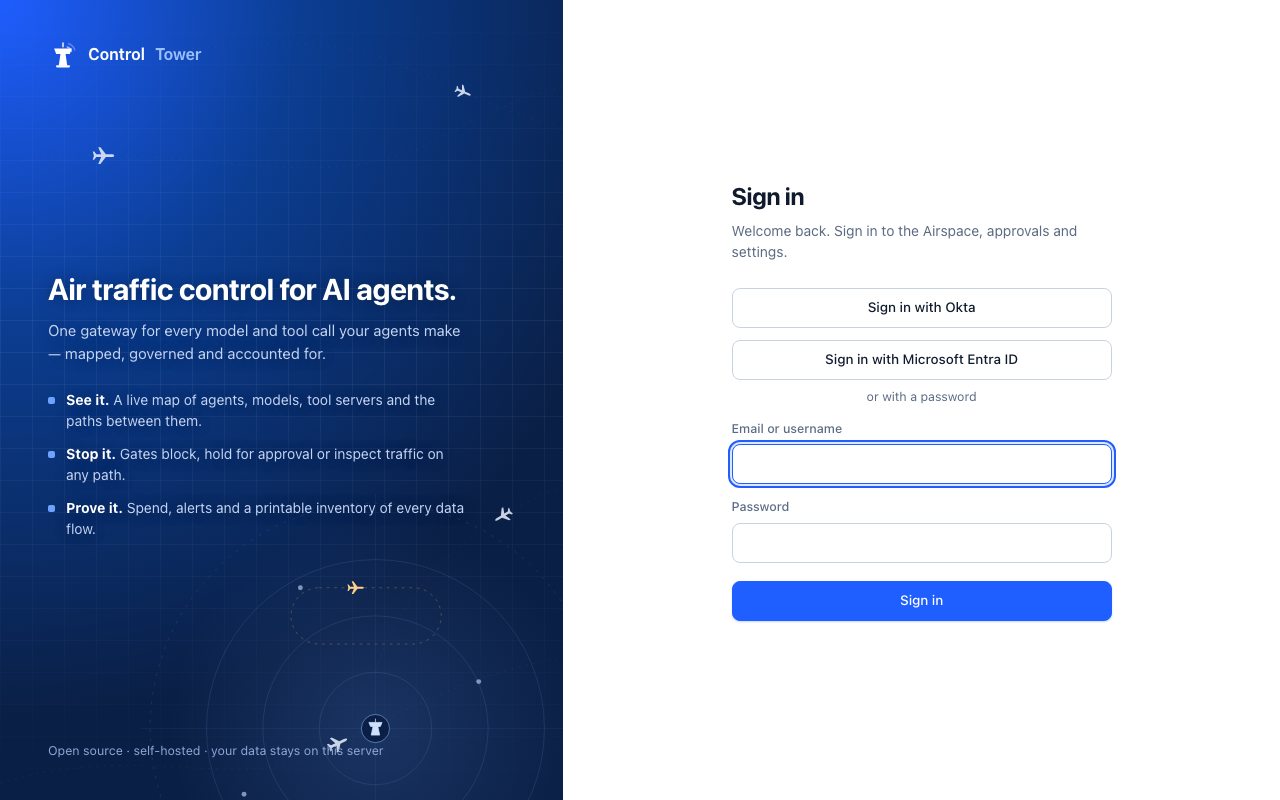
<issuer>/.well-known/openid-configuration).The sign-in page now shows Sign in with name.
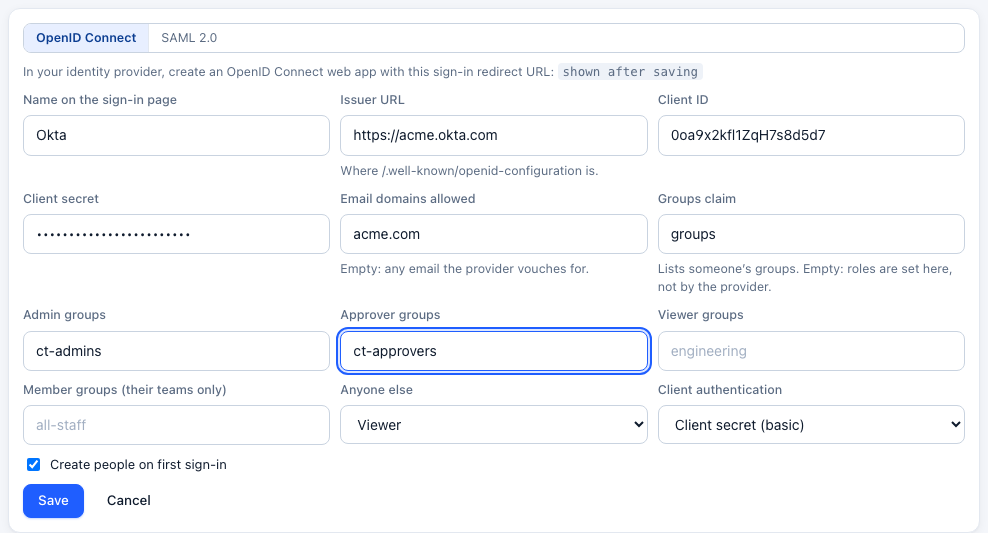

| Setting | |
|---|---|
| Name on the sign-in page | What the button says: "Sign in with Okta" |
| Issuer URL | For example https://acme.okta.com, https://login.microsoftonline.com/<tenant-id>/v2.0, https://accounts.google.com, https://acme.us.auth0.com/, https://sso.acme.com/realms/main. Must be https |
| Client ID, client secret | From the app you created. The secret is stored encrypted, like provider credentials |
| Client authentication | How Control Tower proves itself to the token endpoint: client secret in the Authorization header (basic, the default), in the form (post), or none for a public client (PKCE only) |
| Email domains allowed | Only these email domains may sign in. Empty allows any address the provider vouches for |
| Groups claim, and admin, approver and viewer groups | See below |
| Anyone else | The role for someone in none of the groups: member, viewer, approver, admin, or refused |
| Create people on first sign-in | On: someone who passes the checks above is added with their role the first time they sign in. Off: only people an admin already added by email get in |
SAML
Choose SAML 2.0 when adding the identity provider:
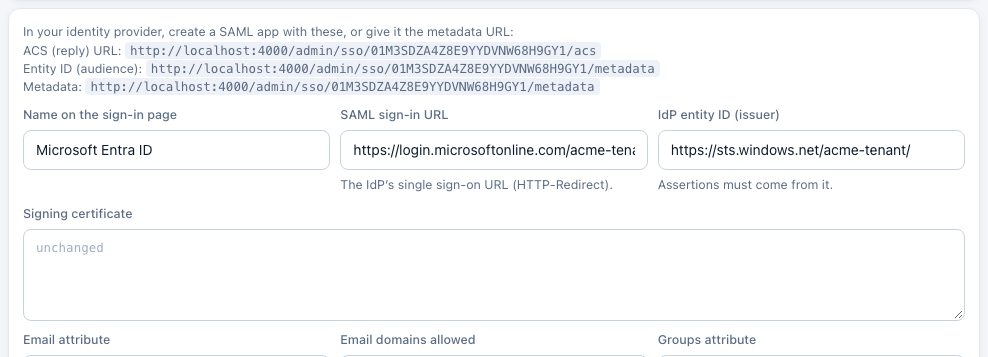
- Enter the IdP's SAML sign-in URL (its single sign-on URL for HTTP-Redirect), its signing certificate (PEM, or the bare base64 many IdPs show), and its entity ID (issuer). Save.
- Edit it to see what to give the IdP: the ACS (reply) URL
…/admin/sso/<id>/acs, the entity ID (audience)…/admin/sso/<id>/metadata, or just the metadata URL (the same address), which the IdP can read itself. - In the IdP's SAML app, send the email as the NameID or as an attribute (
email,mail, or set Email attribute), and groups as an attribute (set Groups attribute to its name, for examplegroupsor Entra'shttp://schemas.microsoft.com/ws/2008/06/identity/claims/groups). - Test checks the certificate can be read and hasn't expired.
What a SAML sign-in must pass:
- The assertion is signed with the certificate you entered. A signed response around an unsigned assertion isn't enough, and signature-wrapping tricks (an extra, unsigned assertion placed beside the signed one) are refused.
- It answers this sign-in. Control Tower starts every SAML sign-in itself. The response must answer the request it sent (
InResponseTo), from the same browser over https, within 10 minutes, and only once: posting the same response again is refused. Sign-ins started from the IdP's own app dashboard (IdP-initiated) are refused; people start from Control Tower's sign-in page. - It's for this service provider (audience), current (with a minute's clock skew), and, with the entity ID set, from your IdP.
Groups and roles
Set Groups claim to the ID-token claim that lists someone's groups (usually groups). A list is read as it is; a single text value is one group, spaces and all ("Domain Admins"), unless it's comma-separated. Then list the groups for each role. Someone in several gets the highest role (admin, then approver, then viewer, then member). Groups can also make people admins or members of teams, set at each sign-in. Someone in none gets the Anyone else role, or is refused.
With a groups claim set, the provider decides roles at every sign-in. Moving someone to another group changes their role the next time they sign in, and ends their other sessions. Leave the groups claim empty to manage roles in Control Tower instead: the Anyone else role applies when someone is first created, and an admin changes it from then on.
Putting groups in the ID token:
| Provider | How |
|---|---|
| Okta | On the app's Sign On tab, add a Groups claim named groups, filtered (e.g. Starts with ct-) |
| Microsoft Entra ID | Token configuration → Add groups claim. Entra sends group IDs (GUIDs), so list the IDs here. Very large memberships are left out of the token |
| Google Workspace | Google doesn't put groups in ID tokens. Use Anyone else with Create people on first sign-in off, and add people and roles in Control Tower |
| Auth0 | An Action that adds event.authorization.roles (or groups) to the ID token under a namespaced claim; set Groups claim to that name, such as https://acme.com/groups. Dotted names read nested claims |
| Keycloak | A Group Membership mapper on the client, claim name groups, Full group path off |
Who gets in
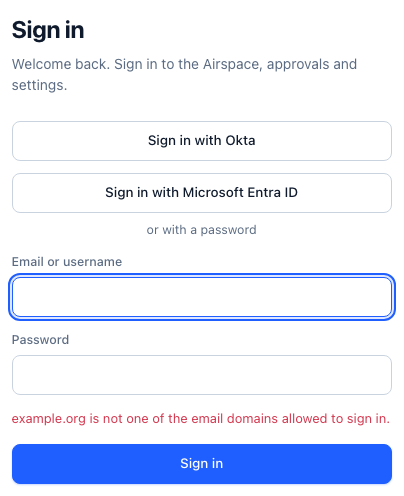
A sign-in is refused, and the reason is shown and recorded, when:
- the provider refuses or the person cancels;
- the email isn't in an allowed domain, or the provider says it isn't verified;
- the person is in none of the groups and Anyone else is refused;
- they haven't been added, and new people aren't created from this provider;
- the email already signs in through a different identity. Someone else at the provider can't take over an existing person's account by claiming their address.
Someone an admin added by email is linked to their provider identity the first time they sign in with it. From then on they're recognised by that identity, even if their email changes. People created by single sign-on have no password; an admin can still give them a one-time password.
Security
- The sign-in uses the authorization code flow with PKCE, plus
stateandnonce. The state travels in a short-lived (10 minute) encrypted cookie that works only for the sign-in callback. A callback can't be replayed, and a stolen or altered state is refused. - The ID token's issuer, audience, expiry and nonce are checked, and so is its signature, against the keys the provider publishes. The OIDC spec allows skipping the signature for tokens fetched directly over TLS; Control Tower checks both.
- Issuers and SAML sign-in URLs must use https. Plain http is allowed only for a provider on the same machine (
localhost), for development. - SAML signatures are checked by
node-samlwithxml-crypto6, pinned; the checks above are tested against tampered, unsigned, foreign-signed, wrapped, misaddressed, expired and replayed responses. - Sign-in attempts are limited per address (three times
CT_LOGIN_RPMa minute).
Only single sign-on
Only single sign-on: turn passwords off makes everyone sign in through the identity provider, and ends existing password sessions.
- It needs
CT_ADMIN_KEY. The admin key keeps working as a sign-in (asadmin) and as a bearer token, which is how you get back in if the identity provider is down or misconfigured. - You must have used it. An admin can only turn it on after signing in with single sign-on themselves (or with the admin key), so nobody turns passwords off without knowing SSO works.
- The last provider can't be removed while it's on.
- Turning it off from outside the console:
curl -X PUT -H "Authorization: Bearer $CT_ADMIN_KEY" -H 'content-type: application/json' \
-d '{"sso_only": false}' https://controltower.example.com/admin/api/sso/settingsAPI
Admins only, except GET /admin/api/sso, which the sign-in page reads without signing in.
| Method | Path | |
|---|---|---|
| GET | /admin/api/sso | {providers: [{id, name}], sso_only}: what the sign-in page offers |
| GET, POST | /admin/api/identity-providers | List, with each provider's redirect URL (OIDC), ACS URL and entity ID (SAML), sso_only and admin_key_set; add one. OIDC: {name, issuer, client_id, client_secret, token_auth, …}. SAML: {kind: "saml", name, saml_entry_point, saml_idp_cert, saml_idp_issuer, email_attribute, …}. Both: allowed_domains, groups_claim, role_map: {admin: [...], approver: [...], viewer: [...], member: [...]}, default_role, create_users |
| PATCH, DELETE | /admin/api/identity-providers/:id | Change (also enabled) or remove. Removing unlinks the people who signed in with it |
| POST | /admin/api/identity-providers/:id/test | OIDC: load the provider's discovery document. SAML: read the signing certificate and its expiry |
| POST, DELETE | /admin/api/identity-providers/:id/scim-token | Issue (shown once) or revoke the provider's SCIM token |
| PUT | /admin/api/sso/settings | `{sso_only: true |
| GET | /admin/sso/:id/start, /admin/sso/:id/callback | The browser sign-in itself (OIDC) |
| POST | /admin/sso/:id/acs | Where the IdP posts its SAML response |
| GET | /admin/sso/:id/metadata | This service provider's SAML metadata (also its entity ID) |
Refused sign-ins come back to the sign-in page as /?sso_error=<reason>. A password sign-in while passwords are off answers 403 sso_required.