 Control Tower
 Policy as code
Zones and gates are drawn on the map — and they are also a YAML file you can review in a pull request, keep in Git, and apply to another install.
- Airspace → Export → Policy as YAML downloads the current policy.
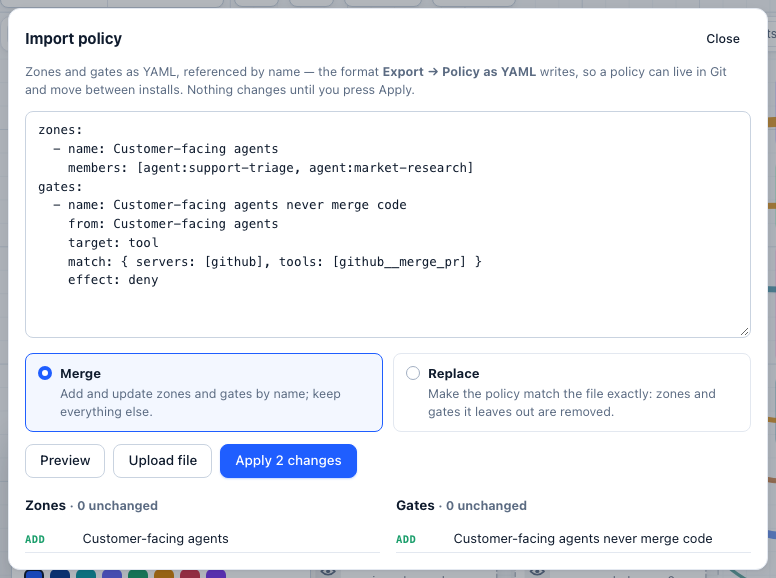
- Airspace → Export → Import policy… applies a file, after showing exactly what it adds, changes and removes.
The format
version: 1
zones:
  - name: AI Labs sandbox
    color: "#d3374e"
    members: [agent:labs-prototype]
  - name: Support
    match: { teams: [support] }          # every key of the team, now and later
  - name: Code hosting
    members: [mcp:github]
gates:
  - name: AI Labs may not merge code
    from: AI Labs sandbox
    to: Code hosting
    target: tool
    match: { tools: [github__merge_pr] }
    effect: deny
    config: { reason: Merges need a human from the platform team }
  - name: Contact deletes need a human
    target: tool
    match: { servers: [salesforce], operations: [admin] }   # destructive: delete_contact
    effect: require_approval
    config: { hold_ms: 20000 }
  - name: No secrets to any model
    target: model
    effect: inspect
    config: { detectors: [secrets], action: block, direction: input }
Zones
| Field | |
|---|---|
name | Unique; gates refer to zones by name |
members | agent:<key name>, group:<agent id> (every key with that agent ID), team:<team> (every key in the team), model:<model name or provider/model>, provider:<slug>, mcp:<slug>, http:<slug>, a2a:<slug> (an A2A agent), tool:<server__tool> |
match | teams, projects, tags (keys) and provider_kinds (models): stations join automatically |
color | Optional |
Gates
| Field | |
|---|---|
name | Unique; used to update the gate on the next import |
from, to | Zone names. Leave out for "any agent" / "anything" |
target | model, tool or any (default) |
match.agents | Key names |
match.groups | Agent IDs: every key carrying one, including keys added later |
match.teams | Teams: every key labelled with one, including keys added later |
match.on_behalf_of | Calls made on behalf of agent:<agent id> or team:<name>, anywhere up a chain of agents calling agents |
match.deployments | Model names (specific deployments) |
match.servers | MCP server, HTTP API or A2A agent slugs |
match.models, match.tools | Globs: gpt-4*, github__merge_*, statuspage__DELETE * |
match.operations | read, write, admin (destructive: deletes, merges, payments, HTTP DELETE), unknown |
match.args | Argument conditions: {path, op: eq | neq | glob | in | gt | lt | exists, value} |
effect | allow, deny, require_approval, allow_with_limits, inspect |
config.limits | For allow_with_limits: rpm, tpm (per agent on the gate's path) and max_tokens (a cap on a model's reply); at least one |
config | reason, hold_ms (how long a call waits; at most CT_HOLD_BUDGET_MS, 20 s by default), bind_fields (approvals: the argument paths an approval is bound to); detectors, keywords, patterns, model_check, services, services_on_error, action, direction (inspect — see guardrail services) |
priority | Lower runs first (default 100) |
enabled | false keeps the gate but switches it off |
Merge or replace
- Merge adds zones and gates that are new and updates those with the same name. Everything else stays.
- Replace makes the policy match the file exactly: zones and gates the file leaves out are removed (with their alerts).
A reference that doesn't resolve — an agent that doesn't exist, a zone the file doesn't define, an unknown detector — stops the import with a list of what to fix, and nothing changes. Demo zones and gates are never exported, changed or removed.
At startup (GitOps)
Keep the policy in Git and apply it every time the server starts:
controltower --config config.yaml --policy policy.yaml
docker run … -v $(pwd)/policy.yaml:/app/policy.yaml ghcr.io/joshmaster2165/controltower --policy /app/policy.yaml- By default the file is merged: its zones and gates are added or updated by name, and everything else is left alone.
- With
CT_POLICY_MODE=replacethe policy is made to match the file exactly — a gate deleted from the file is deleted on the next start. - A file with errors stops startup and lists them, so a broken policy is never half-applied.
- The policy is applied after
--config, so it can name the models and agents the config creates.
From CI
The import examples use jq to wrap the file in a JSON body; install it or build the body another way.
# export
curl -s http://localhost:4000/admin/api/policy/export -H "Authorization: Bearer $CT_ADMIN_KEY" > policy.yaml

# preview, then apply
jq -Rs '{yaml: ., mode: "replace"}' policy.yaml | curl -s -X POST http://localhost:4000/admin/api/policy/import \
  -H "Authorization: Bearer $CT_ADMIN_KEY" -H "Content-Type: application/json" -d @-
jq -Rs '{yaml: ., mode: "replace", apply: true}' policy.yaml | curl -s -X POST http://localhost:4000/admin/api/policy/import \
  -H "Authorization: Bearer $CT_ADMIN_KEY" -H "Content-Type: application/json" -d @-
The preview returns {errors, warnings, zones: {create, update, unchanged, remove}, gates: {…}}; applying a file with errors returns 400. GET /admin/api/policy/export?format=json returns {doc, warnings}: the same document as JSON, plus notes about anything skipped. You can import that response as it is — the importer takes the document out of doc — or import doc alone (JSON is also valid YAML).